The Meta Quest 3 isn't just another VR headset; it's a statement. Marking a fundamental architectural leap, it's the first mass-market "spatial computer" designed to seamlessly blend your physical and digital worlds. Far from a mere console for virtual reality, the Quest 3 represents the definitive standalone extended reality (XR) device for the 2024-2025 cycle, packing an impressive array of Meta Quest 3: Key Features and Upgrades that elevate the experience far beyond its predecessors.
This isn't just about playing games; it's about digitizing your living room, accessing a spectrum of new applications, and experiencing mixed reality in a way previously reserved for high-end, tethered systems. For anyone eyeing the future of computing, the Quest 3 isn't just an upgrade; it's a glimpse into the next frontier.
At a Glance: What You Need to Know About the Quest 3
- Spatial Computing Powerhouse: Not just VR, but a true mixed reality device capable of digitizing your environment.
- Massive Performance Boost: Snapdragon XR2 Gen 2 chip delivers 2.5x GPU power for stunning visuals.
- Crystal-Clear Displays: Dual "4K+ Infinite Displays" with pancake lenses eliminate the screen door effect and sweet spot issues.
- Full-Color Passthrough: High-resolution cameras and depth sensing enable convincing mixed reality.
- Sleeker Design: 40% slimmer optical profile and improved weight distribution for better comfort.
- Ring-Free Controllers: Touch Plus controllers offer a more ergonomic design with advanced tracking.
- Enhanced Connectivity: Wi-Fi 6E and AV1 codec support for superior PCVR streaming.
- Battery Life: Remains around 2 hours, especially shorter for demanding mixed reality.
- Default Strap: Uncomfortable for long sessions; third-party upgrade recommended.
- Repairability: Low score due to inaccessible battery, impacting long-term lifespan.
Beyond VR: A True Spatial Computer Arrives
For years, virtual reality (VR) headsets immersed us in digital worlds. The Meta Quest 3 shifts the paradigm entirely. This device isn't merely a VR console; it's a spatial computer, purpose-built to understand and digitize your living room, opening up a universe of mixed reality (MR) experiences. Imagine virtual objects anchored to your real furniture, digital dashboards floating above your desk, or interacting with a holographic character right there in your kitchen. This is the core architectural leap: moving from pure immersion to seamless blending.
This fundamental shift is powered by a combination of new hardware and software that allows the Quest 3 to map your environment in real-time. It understands surfaces, detects objects, and projects digital content that interacts convincingly with your physical space. It's a foundational step towards a future where digital information isn't confined to a flat screen but lives and breathes within your surroundings.
Raw Power Unleashed: Inside the Quest 3's Engine
The heart of any powerful computing device lies in its processing unit, and the Quest 3 makes no compromises here. It’s a beast tailored for extended reality, driving experiences previously unimaginable on a standalone headset.
The Snapdragon XR2 Gen 2: A New Benchmark
Under the hood, the Meta Quest 3 is powered by the Snapdragon XR2 Gen 2 platform. This chip isn't just an iteration; it's a ground-up redesign specifically engineered for extended reality applications. What does that mean for you?
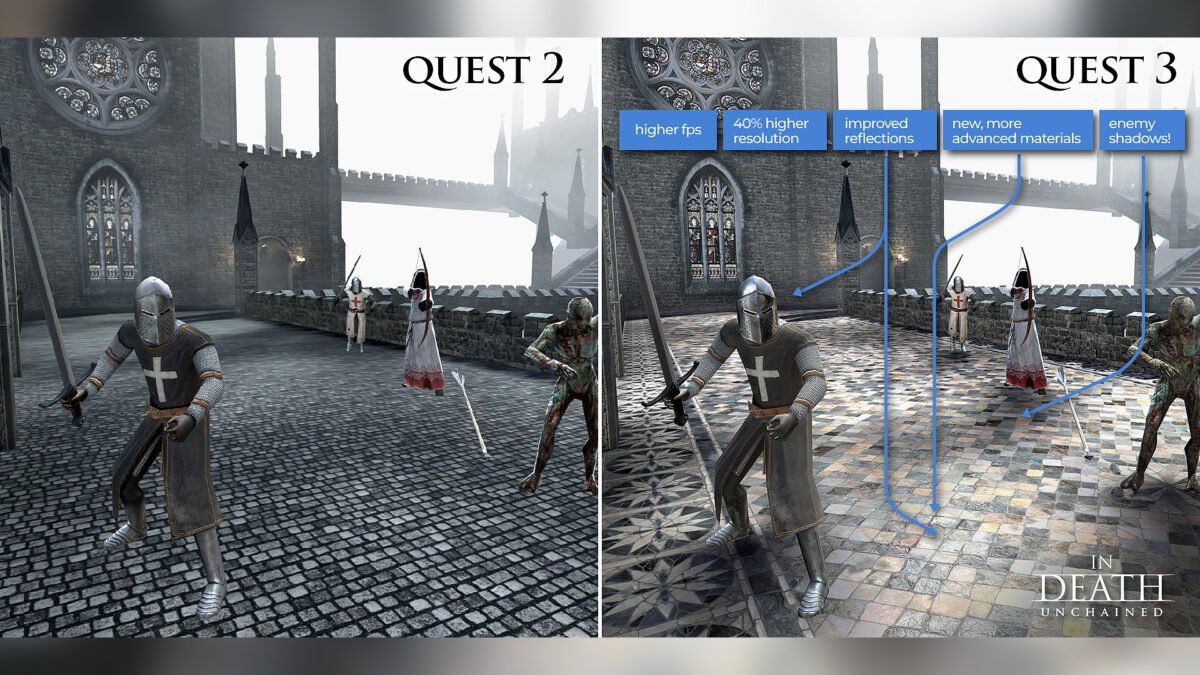
First, a staggering 2.5x increase in graphical processing power (GPU) compared to its predecessor. This translates directly into more vibrant visuals, higher-fidelity textures, and advanced lighting effects that were simply impossible on standalone hardware until now. Games look sharper, environments feel more real, and complex simulations run smoother.
Second, the CPU features a sophisticated "1+4+3" topology. This isn't just a random number; it's a smart design that segregates heavy gaming workloads from critical background tasks like tracking. This ensures that even when you're in the most graphically intense VR battle, your head and hand tracking remain buttery smooth and responsive, preventing jarring interruptions.
RAM: A Tightly Packed Punch
The Quest 3 comes equipped with 8 GB of LPDDR5 RAM. While an upgrade from previous generations, it's still considered a tight ceiling in the broader computing landscape. For today's applications, it's more than sufficient, but Meta is thinking ahead with "Augments"—persistent digital objects and applications that will float in your mixed reality space. This 8 GB will require developers to optimize aggressively to ensure smooth multitasking and future-proof performance for these emerging MR experiences. It’s a testament to the efficient design that so much can be done with this capacity.
A Window to Worlds: Visuals That Pop
What good is raw power if the visuals don't deliver? The Meta Quest 3 truly shines in its display technology, offering a significant leap in clarity and immersion.
Pancake Lenses: Clarity from Edge to Edge
One of the most immediate and impactful upgrades you'll notice is the adoption of pancake lenses. These aren't just a fancy name; they represent a fundamental shift in optical design. Compared to the bulkier Fresnel lenses used in previous Quest models, pancake lenses offer a 40% slimmer optical profile. This results in a much sleeker headset design, reducing the "goggle" feel.
More importantly, pancake lenses deliver superb edge-to-edge clarity. This means no more "sweet spot" issues where only the very center of your vision is clear, forcing you to constantly readjust the headset or move your head excessively. The entire field of view is sharp, making for a much more natural and comfortable viewing experience.
"4K+ Infinite Display": Erasing the Screen Door Effect
Complementing the superior lenses are the dual LCD panels, boasting an impressive resolution of 2064 x 2208 pixels per eye. Meta markets this as their "4K+ Infinite Display," and for good reason. This high pixel density effectively removes the dreaded screen door effect (SDE) – that subtle grid pattern visible between pixels that could break immersion in older headsets. Text is crisp, distant objects are clearer, and the overall visual fidelity is breathtaking for a standalone device.
The Quest 3 supports flexible refresh rates: 72Hz, 80Hz, 90Hz, and 120Hz. This allows developers to optimize for smoothness or battery life, giving you the best of both worlds. The Field of View (FoV) is also notably wide at 110° Horizontal and 96° Vertical, drawing you deeper into virtual worlds.
Navigating the Visual Nuances
While the display is a triumph, it’s not without its minor quirks. Being LCD panels, they inherently suffer from poor contrast in dark scenes. Instead of true, inky blacks, you'll often see a murky grey. This is a common trade-off for the vibrant colors and brightness of LCDs. Additionally, some sensitive users might notice a slight "binocular overlap" or shadow in their central vision due to the canted display geometry. These are minor points for most but worth noting for those highly sensitive to visual anomalies.
Blending Realities: The Magic of Full-Color Passthrough
Here's where the "spatial computer" truly shines. The Quest 3's full-color Mixed Reality is arguably its most defining feature, effortlessly blending physical and digital worlds into a cohesive experience.
Mixed Reality Redefined
The Quest 3 is purpose-built for MR. It's equipped with dual 4MP RGB cameras that provide a vivid, full-color view of your real surroundings, coupled with a central depth projector. This combination doesn't just show you the world; it understands it.
The latency for passthrough is impressively low, typically around 35-40ms. This might sound like a lot, but it's sufficient for you to move around your physical space without experiencing disorientation or motion sickness. The world feels responsive and stable, allowing for truly engaging mixed reality interactions.
Dynamic Occlusion & Its Potential
One of the most exciting advancements is the nascent capability for Dynamic Occlusion. Thanks to the depth sensor, virtual objects can now intelligently interact with real-world furniture. Imagine a virtual character walking behind your couch, or a digital game board sitting on your coffee table, with virtual pieces appearing to be physically blocked by real objects. While still in its early stages of developer implementation, this technology holds immense potential to make mixed reality feel incredibly authentic and interactive.
Passthrough's Practical Limits
Despite its brilliance, the passthrough system does have limitations. The cameras require good ambient lighting (at least 50 lux) to avoid graininess in the passthrough feed. In dimly lit rooms, the feed can become noticeably noisy and less clear. Additionally, while excellent, the perspective correction can occasionally cause slight warping or "wobble" around objects as you move your head. It’s usually subtle but can be noticeable in certain scenarios.
To quickly step out of a virtual experience and see your real world, simply double-tap the side of the headset to activate Passthrough Mode. It's a seamless way to reorient yourself or interact with your physical environment without removing the device.
Designed for Immersion (and Your Neck): Comfort and Build
A powerful headset is only as good as its comfort, especially for extended sessions. Meta has made strides in design and ergonomics with the Quest 3.
Weight Distribution & IPD
Weighing in at 515 g (1.14 lbs), the Quest 3 isn't feather-light, but its slimmer visor shifts the center of gravity closer to your face. This seemingly small change significantly reduces the lever effect, minimizing neck strain compared to bulkier predecessors. You'll likely find it more comfortable for longer periods.
Crucially, the Quest 3 features a mechanical wheel for IPD (interpupillary distance) adjustment, ranging from 53mm to 75mm. This allows you to precisely align the lenses with your eyes, ensuring optimal clarity and comfort, and preventing eye strain.
The Default Strap Dilemma
Here’s where a crucial piece of advice comes in: the default fabric strap is notoriously uncomfortable for long sessions. Many users report fatigue after as little as 45 minutes, with the strap digging into the back of the head. Investing in a third-party rigid or "Halo" style strap is strongly recommended if you plan on extended use. This upgrade dramatically improves comfort and makes the headset much more enjoyable for gaming, productivity, or movie watching.
Sustainability & Repairability
Meta has made efforts toward sustainability, incorporating Post-Consumer Recycled (PCR) plastics into the headset's construction and eliminating plastic from its packaging. This is a welcome step in reducing environmental impact.
However, the Quest 3 scores relatively low on repairability (4/10). The battery, a component prone to degradation over time, is buried deep within the device and is difficult to replace. This limitation could impact the overall lifespan of the device for users who prefer to extend the life of their electronics.
Control Your Universe: Touch Plus & Hand Tracking
Interaction is key to any immersive experience, and the Quest 3 offers refined options for how you engage with your virtual and mixed worlds.
Touch Plus Controllers: A Sleeker Grip
The new Touch Plus controllers are a standout upgrade. They cleverly ditch the bulky tracking rings of previous generations, resulting in a sleeker, more ergonomic design that feels incredibly natural in your hands. This ring-free design also allows for more fluid hand movements without worrying about bumping into things.
Tracking reliability is maintained through advanced AI prediction algorithms and the headset's multiple cameras. For 95% of users, tracking feels flawless and responsive. Competitive players, however, might notice occasional minor drift or glitches in extreme angles or very fast movements. Overall, they represent a significant step forward in controller design.
Hand Tracking: Go Controller-Free
Beyond the controllers, the Quest 3 offers robust, controller-free hand tracking. Utilizing the headset's RGB cameras and the depth sensor, you can navigate menus, interact with virtual objects, and perform gestures using just your hands.
This is ideal for UI navigation, casual interactions, media consumption, and browsing. It feels incredibly futuristic to pinch to select or swipe through content with your bare hands. However, it's not designed for high-precision gaming where speed and exact input are critical. For those applications, the Touch Plus controllers remain superior.
The Quest 3 also supports advanced input methods like Swipe Typing on its virtual keyboard, allowing you to type faster by dragging your finger across letters. For even quicker interactions, Voice Commands let you navigate menus, launch apps, or perform tasks without lifting a finger or touching a virtual keyboard.
Sound & Communication: Immersion for Your Ears
Audio is half the immersion, and the Quest 3 brings improvements to its integrated sound system and microphone.
Integrated Spatial Audio: Loud and Clear (Mostly)
The integrated stereo speakers, discreetly built into the strap arms, are 40% louder than previous generations. They deliver surprisingly convincing spatial audio, making you feel immersed in the soundscape without needing external headphones. You can pinpoint sound sources, adding to the realism of games and experiences. However, like many integrated solutions, they do struggle with sub-bass frequencies, meaning explosions or deep musical notes might lack the full punch you'd get from dedicated headphones.
Microphone: Functional, But Not for Pros
The integrated microphone is functional for casual voice chat and basic commands. However, its quality is generally underwhelming for anything beyond that. The audio often sounds muffled and heavily processed due to aggressive noise suppression. For content creation, streaming directly from the headset, or serious voice-over work, you'll want to invest in an external microphone for clearer, higher-fidelity audio.
Powering Your Journeys: Battery Life & Charging
Portable power is always a trade-off with standalone devices, and the Quest 3 is no exception.
The Runtime Reality Check
The Quest 3 is equipped with a 4879 mAh battery. In real-world use, you can expect a runtime of typically 2.0-2.2 hours for standard gaming. However, for more demanding mixed reality experiences, which utilize the cameras and depth sensor more intensively, battery life can drop to around 1.5 hours. This is a similar runtime to previous Quest models, so heavy users will want to consider external battery solutions.
Charging Smart: USB-C PD Explained
The headset charges via USB-C PD (Power Delivery), meaning it can negotiate higher voltages (9V or 12V) for faster charging. If you plan to use an external battery pack to extend your play sessions, it's crucial that the power bank delivers 18W-22W to keep up with the headset's power drain during active use. Older, standard 5V power banks likely won't be sufficient and may only slow the discharge rather than actively charge the headset while in use. Always check the wattage output of your charger or power bank.
Bridging Worlds: PCVR & Connectivity
While designed for standalone use, the Quest 3 excels at connecting to other devices, vastly expanding its capabilities.
Wireless Freedom: Wi-Fi 6E & Bluetooth 5.2
The Quest 3 supports Wi-Fi 6E, allowing it to connect to the less congested 6GHz spectrum. This is a game-changer for wireless PCVR streaming, providing a virtually interference-free connection that can handle high bitrates with minimal lag. This means a smoother, clearer PCVR experience without the need for a physical cable. It can decode bitrates up to 500 Mbps using H.264+, or for superior image quality at lower bandwidths, it can utilize the more efficient AV1 codec (though this requires a compatible GPU in your PC).
Additionally, Bluetooth 5.2 ensures stable connections to wireless accessories like gamepads or headphones. This robust connectivity means you can effortlessly connect to a PC to play higher-powered VR games, tapping into the vast libraries available on platforms like SteamVR and Oculus PC.
Beyond the Specs: Everyday Enhancements & Accessibility
The Quest 3 isn't just about raw power; it's also packed with thoughtful features and settings that enhance usability and accessibility for everyone.
- Travel Mode: Ever wanted a giant movie screen on a plane? Travel Mode optimizes tracking for confined spaces, making it perfect for enjoying media or light gaming on flights.
- Xbox Cloud Gaming: Connect your Xbox controller and jump into a massive library of Xbox games, no console or TV required. Imagine playing Halo Infinite on a huge virtual screen anywhere you go.
- Parental Controls: Meta offers robust parental controls, allowing guardians to manage what children can access, view, and purchase within VR environments, ensuring a safer experience for younger users.
- Meta Quest Move: This built-in fitness tracker syncs your VR activity data (calories burned, time active) to your phone, helping you track your workouts and achieve your fitness goals.
- Prescription Lenses: If you wear glasses, you can purchase custom prescription lenses (e.g., from Zenni VR) that snap directly into the Quest 3, allowing you to use the headset without your glasses or contacts, providing maximum comfort and clarity.
- Accessibility Settings: Meta has included several options for inclusivity, such as four color-correction options for color-blind users and screen contrast adjustments, ensuring a better experience for a wider audience.
Making the Leap: Is the Quest 3 Right for You?
The Meta Quest 3 stands as the most well-rounded XR device on the market today. It's a testament to Meta's vision for spatial computing, pushing the boundaries of what a standalone headset can achieve. From its groundbreaking processor and crystal-clear displays to its convincing full-color mixed reality and refined controls, it offers a truly next-generation experience.
While its battery life remains modest and the default strap could be better, these are minor caveats in an otherwise stellar package. The Quest 3 isn't just an evolutionary step; it's a revolutionary one, digitizing your living room and blending realities in ways that hint at the future of interaction and entertainment. If you're wondering if this advanced device is the right investment for your immersive journey, you might want to delve deeper into whether Is the Meta Quest 3 worth buying? for your specific needs. It's an investment in a new era of computing, and for many, that leap will be well worth it.